TIC3001-CI-GH-Actions-Tutorial
Tutorial: CI with GitHub Actions
This guide will walk you through the process of setting up a GitHub Actions workflow for Continuous Integration (CI) for a Node.js and Express backend application.
Learning Objectives
Welcome to this guide on Continuous Integration (CI) with GitHub Actions. In this guide, you will learn:
- How to set up a GitHub Actions workflow that automates build and test processes for a Node.js and Express backend application.
Prerequisites
Before starting, ensure that you have the following:
- Basic understanding of Git and version control
- A GitHub account
- Familiarity with the concepts of CI
- Having Node.js and npm installed on your local machine is recommended. You can visit this page for installation instructions. You can still proceed with this guide without them installed; however, some steps in the following sections may need to be skipped.
Initial Setup
-
Fork/clone the repository https://github.com/TIC3001/TIC3001-CI-GH-Actions-Tutorial-Code to your device.
ℹ️ About the project: The repository contains the backend code of an address book application, one that is similar to what you have seen in CS2103/T or CS2113/T but developed in JavaScript. The backend is equipped with basic functionalities, including the ability to add, retrieve, edit, and delete information, by connecting to MongoDB Atlas – a cloud database. Furthermore, the
testdirectory includes a set of integration tests. You will see that they are automatically executed in the CI workflow later.💡You may skip steps 2 & 3 if you do not have Node.js or npm installed.
-
Install all dependencies by running
npm installin the project directory. -
To ensure everything is set up correctly, run
npm test. All tests should pass in the local environment since they are using a mock database.
Setting Up GitHub Actions for CI
Now, let’s set up a GitHub Actions workflow for Continuous Integration (CI). The workflow will be triggered when changes are pushed to the master branch.
-
In the repo you just forked/cloned, create a
.githubdirectory at the root of this project -
Inside the
.githubdirectory, create another directory namedworkflows -
Inside the
workflowsdirectory, create a new file namedci.yml -
Add the following code inside
ci.yml. We will see what this code means shortly:name: CI Pipeline on: push: branches: - master jobs: build: runs-on: ubuntu-latest steps: - name: Checkout repository uses: actions/checkout@v3 - name: Setup Node.js uses: actions/setup-node@v3 with: node-version: '18.x' cache: 'npm' - name: Start MongoDB uses: supercharge/mongodb-github-action@1.9.0 with: mongodb-version: '6.0' - name: Install dependencies run: npm ci - name: Run Tests run: npm run test-ci
name: CI Pipeline

on:
  push:
    branches:
      - master
name: This sets the name of the workflow. In our case, it’s “CI Pipeline”.
on: This specifies the events that trigger the workflow. We use the push event on the master branch. So, whenever code is pushed to the master branch, this workflow will be triggered. You can explore other events that can trigger a workflow e.g., a pull request etc.
jobs:
  build:
    runs-on: ubuntu-latest

    steps:
      - name: Checkout repository
        uses: actions/checkout@v3

      - name: Setup Node.js
        uses: actions/setup-node@v3
        with:
          node-version: '18.x'
          cache: 'npm'

      - name: Start MongoDB
        uses: supercharge/mongodb-github-action@1.9.0
        with:
          mongodb-version: '6.0'
jobs: This section defines one or more jobs for the workflow. Each job represents a set of steps that run on the same runner. In our case, we have a single job named “build”.
runs-on: This specifies the operating system on which the job will run. We use ubuntu-latest, which represents the latest version of Ubuntu available on GitHub Actions.
steps: This section contains a list of steps to be executed in the job. Steps are the individual units of work that run commands or actions.
name: Each step is given a name to make the output more descriptive and easier to understand.
uses: This keyword is used to specify an action that should be executed as part of the step. For example, we use the actions/checkout to check out the code from the repository and actions/setup-node to set up Node.js on the runner.
We also utilize the supercharge/mongodb-github-action to set up a running MongoDB instance in the CI environment. This enables us to perform integration tests and ensure that our application interacts correctly with the database during the test process.
      - name: Install dependencies
        run: npm ci

      - name: Run Tests
        run: npm run test-ci
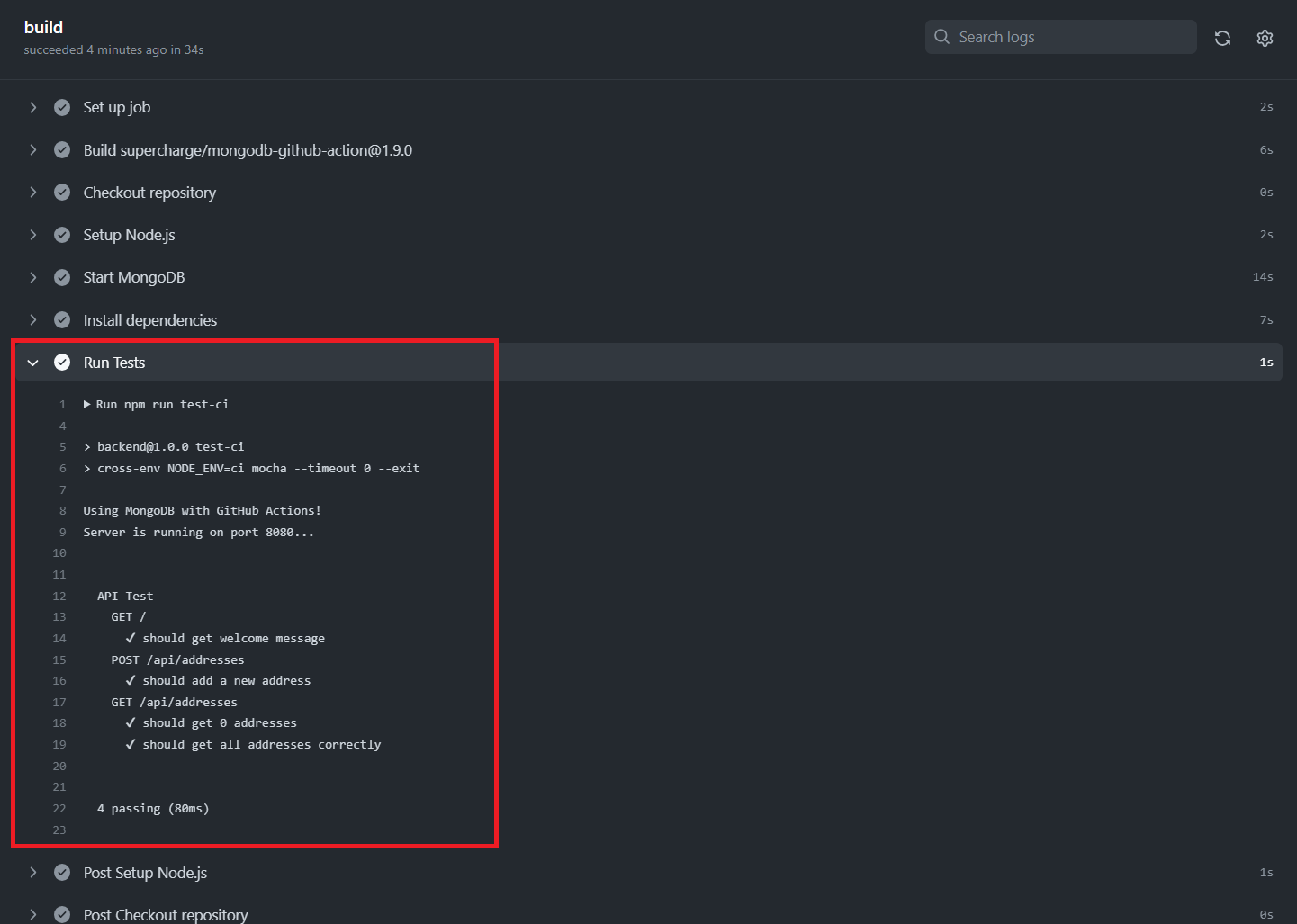
In these steps, we install the project dependencies using npm ci, a standard Node.js command, and then run the tests using npm run test-ci. The definition for the test-ci command can be found inside the package.json file.
📖 Observe CI with GitHub Actions
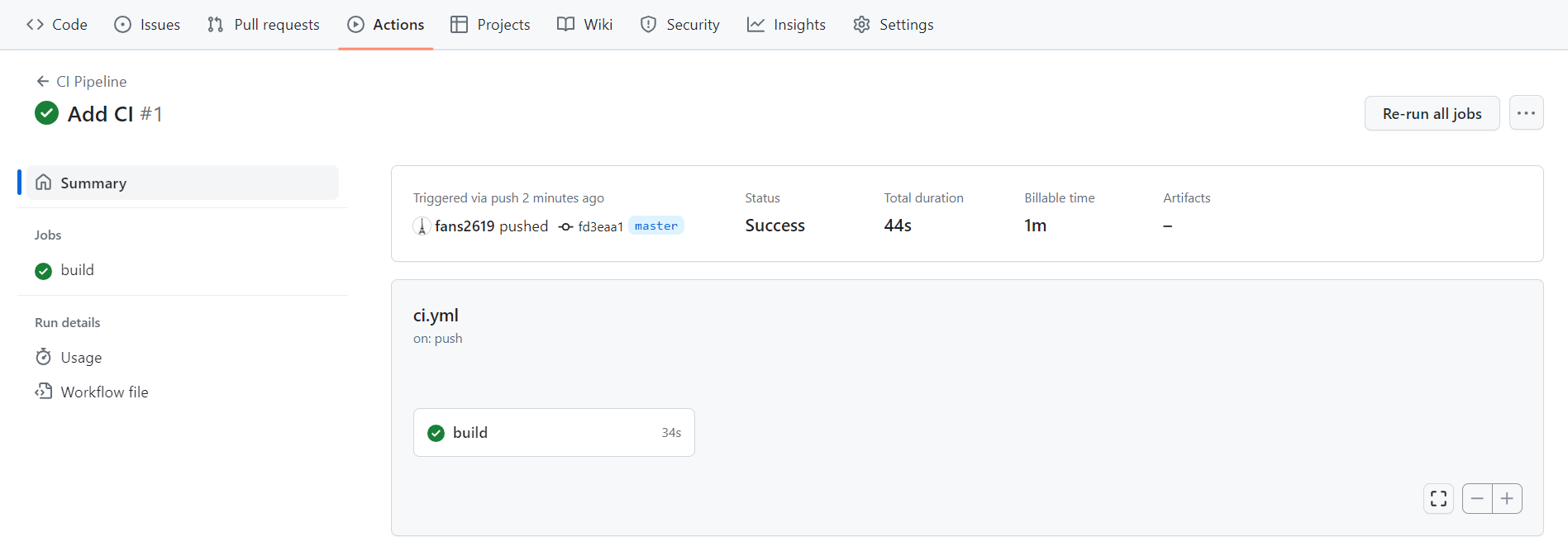
A GitHub Actions workflow has been established to automate the build and test procedures, configured to trigger when changes are pushed to the master branch. To observe this, make sure you have an existing remote repository set up on GitHub, or create a new one if you haven’t already. Once your repository is ready, commit and push your changes to the master branch. As you do this, observe how GitHub Actions automatically triggers and executes the CI (Continuous Integration) workflow. You can then check the workflow’s status and inspect the test results to verify if the tests have passed successfully.
🎉Congratulations on successfully following this CI with GitHub Actions guide!
Use of AI Acknowledgement
This guide’s outline was generated with the help of ChatGPT.
References
Here are the resources that were used to create this guide:
GitHub Docs - Building and testing Node.js